
Scope
This policy covers text (SMS) messages sent from the messaging numbers of products operated by Merkato LLC, doing business as Wheelhouz. Today one program sends messages: BHQ account messages. Programs are added here as sections when a product introduces messaging. The one-time sign-in code a BHQ page offers is not a program: Twilio Verify sends it, only when the person asks for it, and it opts them in to nothing.
Our privacy policy describes how phone numbers and consent records are handled. In short: we do not share, sell, or provide your mobile phone number or messaging consent data to third parties or affiliates for marketing or promotional purposes.
BHQ account messages
Program name. BHQ account messages. (Listed here until October 2026 as “BHQ account invitations”, when the invitation link was the only message.)
Sender. Merkato LLC, doing business as Wheelhouz, operator of BHQ (bhq.app). Every message opens with “BHQ”.
What the messages are. Transactional messages about a worker’s own BHQ account: one confirmation when the worker opts in; the worker’s invitation link to their employer’s BHQ account, if they have not yet accepted it (including when an administrator re-sends it); and messages about the account they belong to. No marketing.
Who receives them. Workers of commercial cleaning and building service businesses that use BHQ — and only those who have opted in themselves, on the BHQ invitation page. BHQ’s messaging number texts a mobile number only after the person who owns it has opted in. The one-time sign-in code is different: Twilio Verify sends it, only when the worker asks for it, and it opts them in to nothing.
How consent is obtained
Consent is given by the worker, on the invitation page, by ticking a box that is unchecked until they tick it. An administrator cannot opt in on a worker’s behalf.
-
An administrator at the employer invites a worker in the BHQ admin console, entering the worker’s name and mobile number. Unless that number has already opted in, BHQ’s messaging number texts nothing at that point.
-
The administrator hands the worker the invitation as a link: a QR code on the administrator’s screen, a printed card, an email, or a message the administrator sends from their own phone.
-
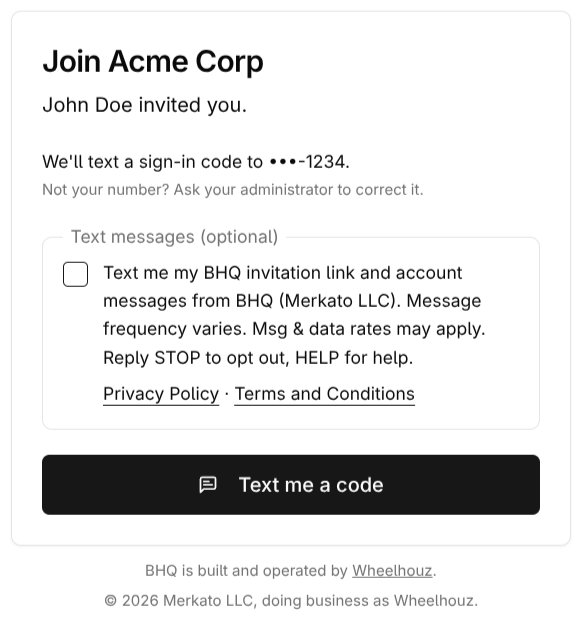
The worker opens the link. The invitation page names the employer and the person who invited them, shows the worker’s number with all but the last four digits hidden (
We'll text a sign-in code to •••-0142.), and, when the worker asks for one, Twilio Verify texts a one-time sign-in code to that number. The code proves the number is theirs and accepts the invitation; the box below is not needed for any of it. -
On the same page, below the number, is an unchecked, optional box. It reads:
Text me my BHQ invitation link and account messages from BHQ (Merkato LLC). Message frequency varies. Msg & data rates may apply. Reply STOP to opt out, HELP for help.Directly under the box are two live links: Privacy Policy opens bhq.app/privacy-policy and Terms and Conditions opens bhq.app/terms-and-conditions.
-
If, and only if, the worker ticks the box, BHQ records the consent and sends one confirmation message to that number — the first message from BHQ’s messaging number. With the employer’s name in place of “ACME Cleaning”, it reads:
BHQ (Merkato LLC): You're signed up for BHQ account messages for ACME Cleaning. Msg frequency varies. Msg&data rates may apply. Reply HELP for help, STOP to opt out. Get the app: https://bhq.app/appAfter that, BHQ texts the worker’s invitation link, if they have not yet accepted it, and account messages — only while that consent stands. If the number has already opted in, BHQ keeps the existing consent and sends no second confirmation.
BHQ records the number, the employer account the worker was joining, the invitation it was given on, the date and time, the version of the box text the worker saw, and the IP address and browser used. Consent is recorded for the mobile number: a worker who opted in while joining one employer may also receive another employer’s invitation link to the same number, and STOP ends all of it. The same disclosure is published in the BHQ privacy policy at bhq.app/privacy-policy, section 4, “How we obtain your consent”.
See the step yourself. A live, public sample of the opt-in step, with a placeholder employer and no account behind it, is at bhq.app/invite/sample. It is served as plain HTML, shows the box exactly as a worker sees it, and sends no message.
Text messaging is optional
Opting in is not a condition of employment, of creating a BHQ account, of any purchase, or of accepting our terms of service or privacy policy. Unless a worker’s number has already opted in, their invitation reaches them as a link — a QR code, a printed card, an email, or a message from their employer — not as a text from BHQ’s messaging number, and they can accept it with the one-time sign-in code and use BHQ without ticking the box. An invitation sent only to an email address is accepted by signing in with that email address, with no text message at all.
Consent is not bundled with anything else. It applies only to the BHQ account messages program described above, and to no other messaging. The box is unchecked unless the worker ticks it, and the page works the same either way.
Stopping messages costs nothing. A worker who replies STOP stops the text messages and keeps full access to BHQ. Their account, their invitation, and their employer’s service are unaffected.
Message frequency
Message frequency varies and follows the worker’s opt-in and account activity: one confirmation when they opt in, their invitation link if they have not yet accepted it (and again if an administrator re-sends it), and account messages as they arise. Most workers receive a small number of messages. BHQ’s messaging number sends nothing to a worker who has not opted in.
Cost
Message and data rates may apply according to your mobile plan. Wheelhouz does not charge for messages.
How to stop
Reply STOP to any message from BHQ. You receive one final confirmation that you are unsubscribed, and BHQ’s messaging number sends nothing further to that number — invitation links and account messages alike, whichever employer’s account they concern. BHQ records the opt-out. Stopping texts does not affect your account or your invitation: a link you were handed still opens, and you sign in with a one-time code from Twilio Verify as before.
Help
Reply HELP to any message for a short reply with our contact details — BHQ (Merkato LLC): help at hello@wheelhouz.com. Msg&data rates may apply. Reply STOP to opt out. — or email hello@wheelhouz.com.
Sample messages
The employer’s name is filled in from the account the worker is joining; “ACME Cleaning” stands in for it here.
- Confirmation, the first message from BHQ’s messaging number, sent only after the worker opts in:
BHQ (Merkato LLC): You're signed up for BHQ account messages for ACME Cleaning. Msg frequency varies. Msg&data rates may apply. Reply HELP for help, STOP to opt out. Get the app: https://bhq.app/app - Invitation link:
BHQ: Your invitation to ACME Cleaning's BHQ account: https://bhq.app/invite/x7Kq2mP9vR4tN8wL3jH6fD1sA5gY0bZc Reply STOP to opt out. - Workers invited in Spanish receive the same messages in Spanish:
BHQ (Merkato LLC): Te registraste para recibir mensajes sobre la cuenta de BHQ de ACME Cleaning. La frecuencia de los mensajes varía. Pueden aplicarse tarifas de mensajes y datos. Responde HELP para recibir ayuda, STOP para cancelar. Descarga la app: https://bhq.app/appandBHQ: Tu invitación a la cuenta de BHQ de ACME Cleaning: https://bhq.app/invite/x7Kq2mP9vR4tN8wL3jH6fD1sA5gY0bZc Responde STOP para cancelar.
Carrier disclaimer
Carriers are not liable for delayed or undelivered messages.
Contact
Merkato LLC, doing business as Wheelhouz. hello@wheelhouz.com.